


Quick Answer
A slow website costs you leads in two compounding ways: Google ranks faster pages higher, so slow sites get less organic traffic to begin with, and visitors who do arrive leave faster when pages take too long to load. Per the 2025 Web Almanac, only 48% of mobile origins pass all three of Google’s Core Web Vitals — meaning more than half of websites are actively losing ground on both fronts at once.
Your website might look great. The copy might be sharp, the brand colors on point, the services page clear. But if the pages load slowly, none of that matters — visitors leave before they read it, and Google notices before visitors even arrive.
Site speed is one of those website problems that’s invisible to the person who built it (because they’re on a fast connection, already have the page cached, and are biased toward not seeing a problem) and completely obvious to every first-time visitor loading it on a mobile network. For small-to-medium sized business owners and decision makers trying to get more leads from their website, that makes speed a revenue issue, not just a technical one. This post breaks down what site speed is, how it affects SEO and lead generation, the most common causes of slow WordPress sites, how to test performance with tools like Google PageSpeed Insights and GTmetrix, and the practical fixes that can improve load times, bounce rate, and conversions.
Why a Slow Website Hurts Your Lead Generation
A slow site creates a two-sided problem that compounds on itself.
On the search side: Google uses Core Web Vitals — its set of measurable, field-data-based speed and experience metrics — as a ranking signal. Pages that fail those thresholds are at a disadvantage in search results, which means fewer people find you in the first place.
On the conversion side: visitors who do arrive make snap judgments about whether a page is worth their time, and users are quick to leave when the page load time feels sluggish. A 1-second delay in page load time can lead to a 20% drop in conversions, while a page that takes more than a second or two to feel responsive will see a higher bounce rate — more people leaving immediately — and less time spent on site. Both of those signals feed back into SEO performance. The result: slow speed reduces traffic, then reduces what you do with the traffic you have.
What Is Site Speed?
Site speed is how quickly your website’s content loads in a visitor’s browser — images, text, forms, videos, and everything else. In plain terms, it’s also your site’s page speed. It’s measured both as raw load time and as a set of user-experience metrics that capture what the load feels like, not just how long it technically takes.
Several technical issues can drag your site down, including:
-
Large images that haven’t been compressed to reduce file size
-
Too many scripts or plugins running in the background
-
Poor hosting performance
-
Bloated themes or page builders
-
No browser caching or code minification
-
Unoptimized mobile performance
Most of these are fixable with a performance audit, image optimization — a core step recommended by Google — plugin cleanup, outdated code removal, and proper caching.
Common causes of a slow WordPress site
-
Oversized or uncompressed images
-
Too many plugins, especially ones that add scripts to every page
-
No caching layer (every visit rebuilds the page from scratch)
-
Hosting that’s underpowered for your traffic
-
Embedded videos or sliders that load heavy assets upfront
-
Malware or injected scripts running in the background
-
Storing large media files directly on the web server
Most of these are fixable without rebuilding anything from scratch. Hosting, caching, and image optimization alone resolve the majority of WordPress speed issues we see.
How to Measure Your Site Speed
The good news: speed testing is free and takes about two minutes.
Google PageSpeed Insights
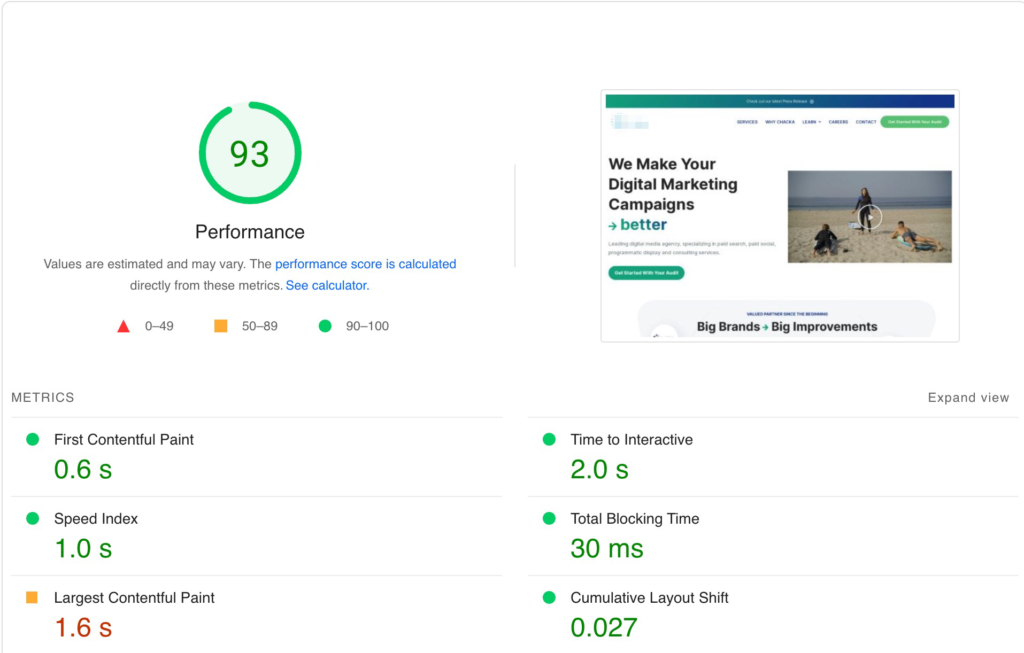
PageSpeed Insights scores your site from 0–100 on both mobile and desktop. More importantly, it measures your actual Core Web Vitals using real-world visitor data (where available) and flags the specific issues dragging your score down. 53% of mobile users abandon sites that take longer than 3 seconds to load.
The three Core Web Vitals Google actually measures in the field:
-
Largest Contentful Paint (LCP): How long until the largest visible content element (usually a hero image or headline) finishes loading. Target: 2.5 seconds or faster.
-
Interaction to Next Paint (INP): How quickly the page responds when a visitor clicks, taps, or types. Target: 200 milliseconds or faster. Note: INP replaced First Input Delay (FID) as an official Core Web Vital in March 2024 — any post still referencing FID is out of date.
-
Cumulative Layout Shift (CLS): How much the page content unexpectedly moves around while loading. Target: 0.1 or lower. A high CLS means visitors accidentally click the wrong thing because the page jumped.
PageSpeed Insights also shows lab-based diagnostics — First Contentful Paint, Speed Index, Total Blocking Time — which are useful for diagnosing specific issues but aren’t the same as the field-measured Core Web Vitals.
If your mobile score is below 70, that’s worth fixing. Mobile is typically the slower of the two scores, which matters because mobile users often visit on slower mobile devices, and it’s the version Google evaluates first for search rankings. Our Website Performance Monitoring and WordPress Speed Optimization services are built specifically around closing that gap.
GTmetrix
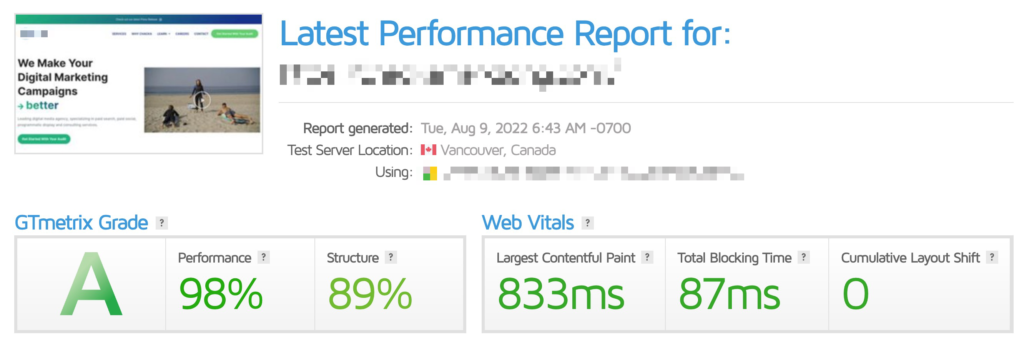
GTmetrix is a useful second opinion. It scores your site on both performance and structure (the setup of the page itself, which affects how efficiently it loads), and evaluates your website’s performance overall, with Web Vitals broken out separately. It’s especially helpful for diagnosing what’s causing a poor score, not just confirming that you have one.
What GTmetrix highlights:
-
Page structure and how efficiently assets load
-
Mobile/responsive load performance
-
Layout stability (how much the page shifts after initial load)
If your GTmetrix grade is below an A, or your Web Vitals are flagged, there’s a fixable problem. Reach out for a free consultation.
Does Site Speed Affect SEO?
Yes, directly and measurably. Google has used Core Web Vitals as a ranking factor since 2021, and search engines increasingly use performance and usability signals when determining visibility. A site that passes all three Core Web Vitals thresholds is eligible for better placement in search results than one that doesn’t — and per the 2025 Web Almanac (HTTP Archive, CrUX data through July 2025), only 48% of mobile origins and 56% of desktop origins pass all three. That means passing puts you ahead of more than half of your competition, not just clears a technicality.
Beyond rankings, speed affects the behavioral signals Google also weighs: bounce rates, session duration, pages visited, and overall user satisfaction. Slow pages can also lead to fewer repeat visits; 79% of shoppers dissatisfied with website performance are less likely to return. A faster site keeps visitors engaged longer, which feeds back into better organic performance over time.
Site speed factors that directly affect SEO:
-
LCP, INP, and CLS (the three field-measured Core Web Vitals)
-
Mobile score — Google indexes your mobile version first
-
Bounce rate driven by slow load times
-
Time on site and pages per session
Why Site Speed Matters More Than Ever in 2026
The bar keeps moving. In 2021, Core Web Vitals became a ranking factor. In 2024, INP replaced FID, raising the standard for interactivity. The percentage of sites passing all three thresholds has grown, but so has the gap between sites actively investing in performance and many businesses still ignoring it.
A faster site in 2026 means:
-
Better search visibility — passing Core Web Vitals gives you a ranking edge over the majority of sites still failing
-
Better user experience — slow pages create a poor user experience, while stronger speed improves satisfaction for people on mobile networks or older devices and can lower support costs
-
Better lead generation — fewer potential customers leaving before they see your CTA means more of your traffic turns into enquiries
-
More potential revenue — the real cost of slow performance is the compounding effect of lost traffic, lower conversion rates, and reduced customer satisfaction
Frequently Asked Questions
Why is my slow website costing me leads? A slow website reduces leads two ways: it suppresses your search rankings (Google favors pages that pass Core Web Vitals), and it increases bounce rate — visitors leave before they reach your call-to-action. Both effects compound: less traffic, and less conversion from the traffic you do get, which creates missed opportunities.
What is a good website speed score? On Google PageSpeed Insights, aim for 90+ on desktop and 70+ on mobile as a baseline. More importantly, aim to pass all three Core Web Vitals thresholds (LCP ≤ 2.5s, INP ≤ 200ms, CLS ≤ 0.1) — those are the field-measured signals Google actually uses for rankings.
What are Core Web Vitals and why do they matter? Core Web Vitals are the three user-experience metrics Google uses as a ranking factor: Largest Contentful Paint (load speed of main content), Interaction to Next Paint (responsiveness to clicks/taps), and Cumulative Layout Shift (visual stability). Per the 2025 Web Almanac, only 48% of mobile sites pass all three — so passing is a real competitive advantage.
What slows down a WordPress website? The most common culprits are oversized images, too many plugins, no caching, underpowered hosting, and embedded sliders or videos that load heavy assets on every page visit. Most WordPress speed issues are fixable through hosting, caching, browser caching, and image optimization without rebuilding the site.
How do I test my website’s speed for free? Use Google PageSpeed Insights for official Core Web Vitals data and GTmetrix for a detailed structural breakdown. Both are free and give you specific, actionable recommendations.
Does fixing site speed actually improve leads? Yes. Faster load times reduce bounce rate, increase session duration, and help convert visitors while increasing phone calls from your site — all of which drive conversions. Combined with the SEO ranking benefit, improving site speed is typically one of the highest-ROI changes a small business website can make across SEO, conversions, and digital marketing.
Conclusion
A slow website is a leaky funnel — it loses potential leads at the first point of contact, before they’ve read a word about what you offer, and impressions matter because a sluggish website can undermine trust before visitors act. Fixing it improves your Google rankings, keeps visitors on the page longer, and gets more of them to your call-to-action.
Start with a free speed test at PageSpeed Insights to see where you stand. If your scores need work — especially on mobile — book a free consultation or take a look at our WordPress Care Plans for ongoing performance monitoring and optimization.
What is GTMetrix Site Speed Test?
GTMetrix is one of many third-party tools that will grade your website’s speed. This is a great option to confirm your website’s speed and identify ways to improve it. GTMetrix breaks down the score into two components, Grade and Web Vitals.
The grade consists of the letter grade, performance of the website, and the structure of it, which affects load speeds of the content. The latter half is the Web vitals which consist of three factors relating to how quickly the largest content loads, how much content moves or shifts on the page, and load speeds in responsive mode (on a mobile device or tablet)
What’s important to GT Metrix?
- Structure of the website
- How quickly it loads in responsive (mobile/tablet)
- How much the pages moves after loading
If you scored poorly on GTMetrix site speed grade (below A) and would like some assistance in improving how quickly your pages load CONTACT US!
Does my website speed affect SEO?
Yes, having both your desktop and mobile in the 80-90+ range is great for user experience and impacts how your site will appear in the rankings. Google favors pages that have higher site speeds on both mobile and desktop.
Increasing or improving your site speed can assist in reducing bounce rate, or the amount of users who immediately exit the site after entering and how long the user stays on site, both of which impact your SEO effectiveness. Improving user experience and the time they spend on the website, and reducing bounce rate can lead to improved conversion rates, generating more leads for your site, turning it into a powerful revenue generator.
What Site speed factors contribute to SEO:
- Actual page speed
- Mobile
- Desktop
- Google Core Web Vitals
- Bounce Rate
- Users’ Time Spent on Website
Why does site speed matter in 2023?
- Better User Experience
- More Effective SEO
- Better Leads
- More Potential Revenue
Your website’s speed is more important than ever before. Increasing website speed not only improves the user experience of your website, but assists you when Google is displaying websites in search results.
Conclusion
In 2022, website speed is extremely important and is one of the easier ways to improve your website. Not only will it improve user experience, but also the effectiveness of SEO. Utilizing tools like Google Site Speed Test and GTMetrix will provide a baseline of where you are at, to help you get to where you want to go.
If you are struggling to improve your website’s speed, we can help! Reach out to us for a free consultation to improve your website or web audit to supercharge your website today!
