
5 WordPress Website Essentials In 2023

Call-to-Action

If you can only choose one way to improve your website, the Call To Action is of paramount importance. It is the direct way to make your website a tool for profit rather than simply a monthly expense. With that being said, the attention span of visitors to your website is shrinking every year. In 2022, you have an average of about 15 seconds to engage with the user. In the limited time you have, the action you want your website visitors to take should be blatantly obvious, engaging and accomplishable in a short amount of time.


How do I figure out what my Call-to-Action is?

Deciding your Call-To-Action or CTA is more important than ever given the limited exposure you will likely have to your target market. Identifying that market is key in deciphering what your CTA should be. You can begin to better understand your target market by reviewing past customers. Understanding the trends and commonalities amongst your previous customers will give insights into who you should look for in the future. 

Are you selling to other businesses or individual consumers? What is the size of the company or availability of resources of the individual you’re selling to?

These two questions can help you further understand the type of client you are looking for.  After identifying your target market, it is key to decide the most important thing you would like your website visitors to do. Creating a list of what you would like people to do when they visit your website and then organizing them, can help decide what is the most important. The main CTA you decide should help guide your website from top to bottom!
Mexican Restaurant Tex Mex Grill Moes Southwest Grill 2022 06 21 at 9.06.28 AM

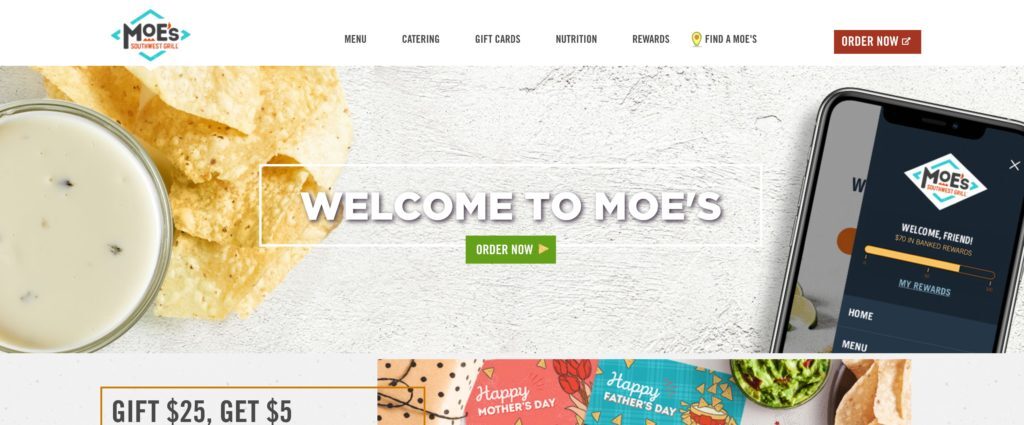
This is an example of a direct, clear call to action to order food. Website visitors know exactly what the company would like you to do prior to leaving the website. There is other information and content below this main CTA section, however it does not clutter users from understanding the objective of the website, rather enriches it with more details to encourage that initial action. While your CTA does not need to be this big, taking up the entire top section of the home page, this is a clear example of how being direct and obvious can encourage visitors to follow your call to action, thus making your website a tool for lead generation.
Waffle House Good Food Fast 2022 06 21 at 9.09.38 AM

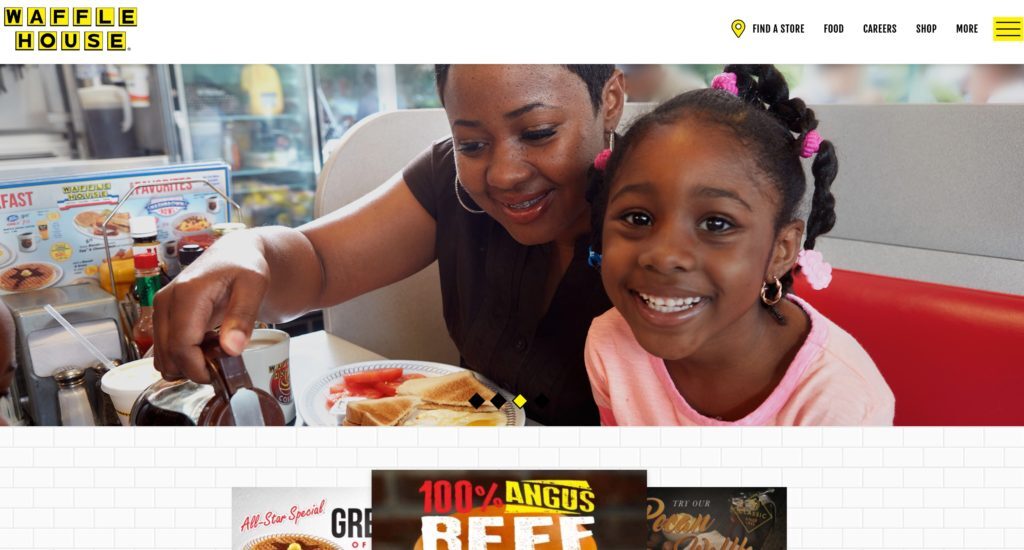
While this website showcases a clean design, there is no clear call to action. The intent of the site might be to showcase their food or locations rather than to take online orders, however, there is no clear distinct action for the user to take when they first enter the website. A few quick changes, like adding a clear intent for the user, whether to see the menu, nearby locations, or in fact order online, adding simple text and a clean button would help point users in the direction the company wants them to go when visiting.  


Site Speed

Website speed is more important than ever before with not just desktop, but mobile site speed having an overall impact on where your website ranks in search results (specifically Google). Given this, site speed can impact your ability to generate traffic and leads, affecting your bottom line.


What is SEO and why does it matter?

SEO, or Search Engine Optimization is a way to optimize your website’s searchability to appear higher for specific keywords or terms related to your business. SEO can be related to organic keywords, or targeting what your website is already about through the content that is on your pages, or through paid search, which is paying to appear in the search results of specific keywords. Improving your website’s SEO can assist in producing higher quality leads in the target market you are aiming for. 


How do I know the current speed of my website?

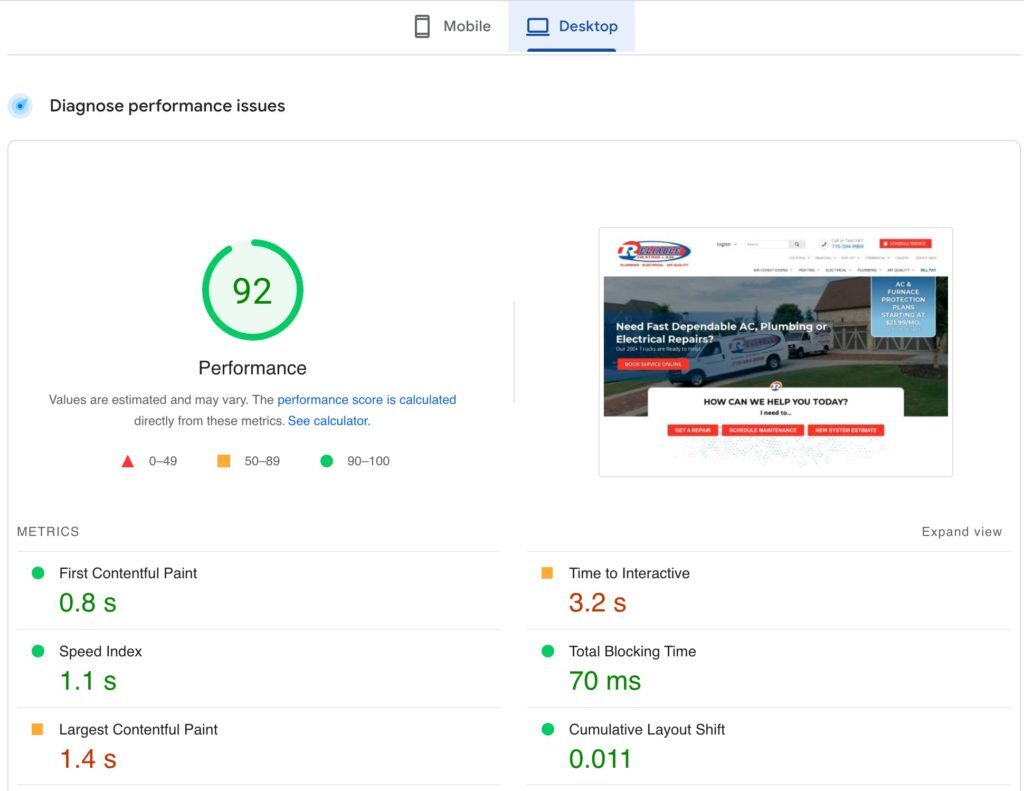
It is important to understand how fast your website currently loads on both mobile and desktop and there are many free tools to do so. Some of the tools we recommend using include Google Site Speed Tool, GTMetrix and PingDom. All three of these tools are free and will provide slightly different information about your website’s speed. With the increase in mobile users, mobile site speed is becoming exponentially important in how Google views and ranks your website. While having a high desktop speed is still very important, it is essential to focus on both Mobile and Desktop site speed. A good starting point would be to aim for a score of 70 on both mobile and desktop assessments. If you’re unsure of what’s causing your website to have a slow speed score or need help improving contact us here

PageSpeed Insights 2022 06 21 at 9.33.58 AM

What are Google Core Web Vitals?

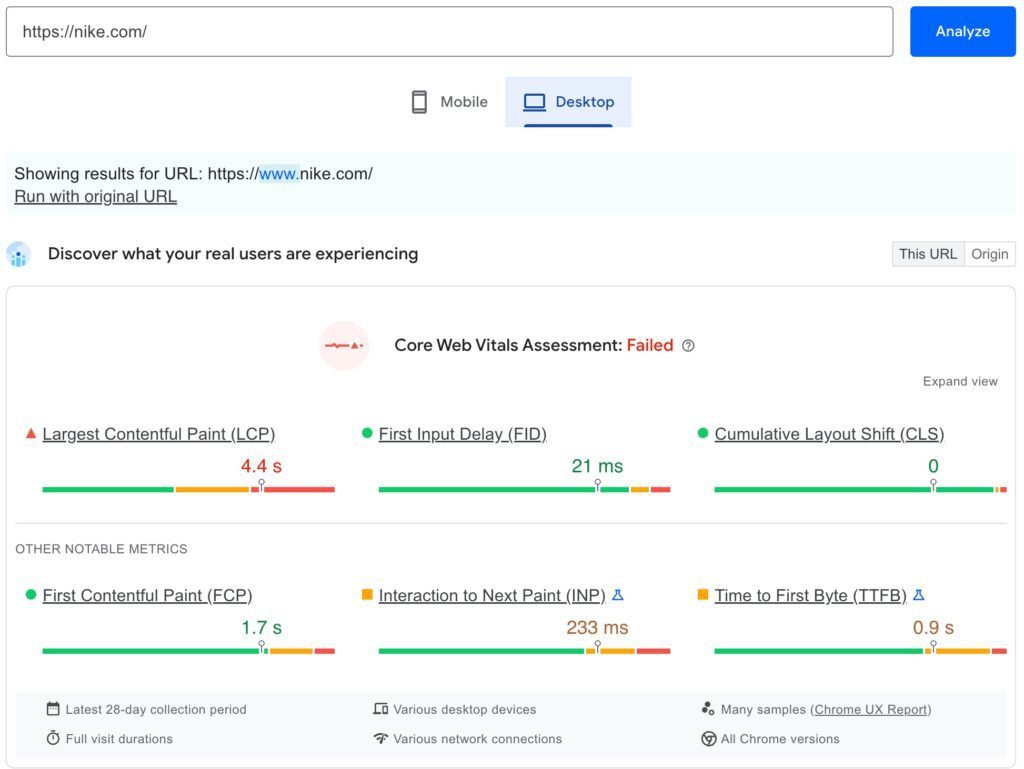
Google Core Web Vitals is a way to measure the performance of your website. Specifically the Core Web Vitals include the load speed of the pages on your website, how soon you can interact with a page, and the stability of your pages as website users interact with them. According to Google, about 40% of websites pass Google Core Web Vitals. You can test your site’s Core Web Vitals Here. If your website passed, great, you have quite an advantage already! We are excited that you have a foundation in place for a strong, high-performing website. If your website did not pass Google Core Web Vitals check, we can help! Reach out to us HERE to supercharge your site for success!
PageSpeed Insights 2022 06 21 at 8.40.41 AM

The Importance of Mobile Optimization

If you have read this far, you know that desktop is not the only way websites are being accessed today. Mobile access to your site is of ever increasing importance, not only because website visitors are more frequently accessing your site via their mobile device, but also because of the emphasis Google places on mobile optimization and speed in 2022. As we discussed earlier, part of the hierarchy of Google’s search rankings are based on Mobile speed. Optimizing mobile speed can be tricky as you do not want to lose the core functionality and intent of your website. If you need help structuring your website for a mobile device, reach out to us here. Having a website optimized to work on mobile will reduce bounce rates and keep users engaged on any device. Below are two examples of websites on a mobile device. One done well and the other, well not so much.

Slack hypersite website hypersite Marketing 2022 06 20 at 3.18.33 PM

This company has a website that is well formatted and optimized for mobile. For example, at the top, you see the Company Logo fully visible (on the left), with an indication of a pullout menu on the right (Three Lines/Hamburger Menu on the right). The text is centralized with a border between the text and the edge of the phone screen, and a centralized button that matches the rest of the text. As an additional bonus, there is a clear call to action on what they want their visitors to do before they leave the site. 

Slack hypersite website hypersite Marketing 2022 06 20 at 3.23.38 PM

This company has a website that is not optimized for mobile. You will notice some clear differences from this website and the one above. This website does not have a visible logo, the menu formatting is very off and only optimized for desktop, the images in the main section are not loading and there is no clear Call to Action, or “essential task” that the user should be doing prior to leaving the website. 


While we are not trying to be demeaning to the second website pictured, there is a clear difference between a website built or customized with a mobile perspective iin mind. If you are struggling to optimize your website for mobile viewing we are here to help. Reach out to us to learn more about how, with a few tweaks, your website can be ready for mobile visitors. 


Focus Your Website (Niche Targeting)

Creating a website is a great way to continue to build your small business. Whether you want to sell products or showcase the awesome services your business provides, creating a clean, focused website is key to creating value for customers. Deciding your niche, or the “small” group of people you want to target as your customer can help guide your CTA and overall website design and layout, thus helping increase conversion rate and ability to generate business through your digital presence.  


What does it mean to have a “focused” website?

A focused website is simply a website that utilizes the main Call-To-Action as a filter for building the website. Focusing your website is simply another way to say Niche down. Once you have decided what you want your website visitors to do when they arrive on your small business’s website, you can utilize that to push visitors to that action across the website. From a business perspective this will help you reduce clutter on your website and focus visitors on the main reason you wanted them to visit your website initially. 


For example, if you have decided that you want visitors to book a free 15-minute consultation with you, then that CTA should be obvious and easily available for your website visitors. You should not have multiple different CTAs like; schedule a free consultation, buy this product, book a full appointment, sell us your old products that all share the objective of the customer. That doesn’t mean that your website can’t have these pages, but it means you should focus your website to accomplish the big goal or your main CTA. Not only will this reduce confusion for your website visitors, it will assist in increasing conversion rates if website visitors know exactly what you want them to do before they leave the website. 


Security

Security should be the foundation of your website. In 2022, there are more threats on the internet than ever before. However, there are ways to combat this like obtaining an SSL certificate for your website and completing scheduled maintenance and updating your plugins and themes.


What is an SSL Certificate?

An Secure Sockets Layer or SSL Certificate is a digital certificate that allows an encrypted connection from server to browser while confirming a website’s identity. This is important because it allows your website to safely secure online transactions and protect the personal information of those visiting your website from being stolen or leaked by transmitting information in a manner that is not readable. An SSL Certificate is key to protect not only your data, but the data of your customers, and is an essential part of avoiding liability on your website. 


If you request an SSL Certificate for your own website, you will notice it is complete when the beginning of your URL changes from http:// to https:// and there will also be a secure lock located in the address bar. 


Do I need to update plugins on my website?

First, we should address what a plugin is. A plugin is simply just a piece of software that can be added or “plugged in” to your website to add additional abilities in functionality or design. The simple answer to this question is, yes. If you have plugins installed on your website, updating them on a regular basis will help reduce the threat of vulnerability that someone can potentially access through out-of-date plugins. After updating your plugins, you will want to make sure that your website formatting and functionality is still in place. If key areas of your website like the menu for form collection stop functioning after you update them, it can seriously impact the effectiveness, and therefore profitability of your website. If you are unable or unsure of how to safely update your website, we can help!


One way to reduce the risk of plugin vulnerabilities is to vet and review plugins before you install them. Take note of things like how many times the plugin has been installed and what the reviews say. A plugin with 300,000+ installs will be better supported by a more thorough development team, thus providing more frequent updates to fix general issues and bugs compared to a plugin that has only been installed 800 times. A plugin that is monitored and updated on a more frequent basis will be less likely to have security issues caused by outdated plugins.


What is a DDoS attack and how can I prevent it?

A Distributed Denial-Of-Service, or DDoS Attack is a cyberattack on a website where an attacker will flood a server with extreme levels of traffic to prevent users from accessing the website. A DDoS attack can cause users to lose access to your website, causing loss of potential revenue and can force customers to turn elsewhere. To minimize DDoS attacks, there are many softwares that can be used like CloudFlare, WebRoot, DataDome and hundreds of others. If you need help with DDoS protection, we can provide assistance to you.


Closing

While these five topics are essential areas to review for your small business’s website, they are not all encompassing. There are thousands of resources available on each of the topics covered and learning about them can help you better understand how to increase the power of your website. These are five of the foundational elements in understanding how to utilize your website as a tool for generating leads, income, or visibility to your small business, rather than having it be viewed as an expense. For more about how to maintain the functionality of your call to action, and website as whole, read more on website maintenance plans.

If you need help with these five foundational areas, or other parts of your small business’s website, we are here to help. Contact Us Here or reach out to get started powering your business. 

 

WordPress maintenance vs management is the single most expensive misunderstanding in the WordPress services market, and most agencies actively make it worse.

Quick answer: In the WordPress maintenance vs management comparison, maintenance is the technical upkeep that keeps a site running — updates, backups, security scanning, uptime monitoring. Management includes all of that and adds ownership of the site’s direction and performance. Maintenance keeps the site alive. Management is accountable for what it does.

Most providers reduce WordPress maintenance vs management to two tiers sitting side by side on a pricing page. Pick one.

That framing is wrong, and it is why so many businesses sign a contract expecting one thing and receive the other. Maintenance and management are not siblings. Management is the superset that contains maintenance. Every genuine management engagement includes the full maintenance task list. No maintenance plan includes management.

Get the WordPress maintenance vs management decision wrong and you end up with a site that is perfectly updated, perfectly backed up, perfectly secure — and going nowhere.


WordPress maintenance vs management at a glance

 WordPress MaintenanceWordPress Management
Core questionIs the site working?Is the site working for the business?
PostureReactive and scheduledProactive and strategic
Who decides what changesYou do. The provider executes.The provider recommends. You approve.
ScopeUpdates, backups, security scans, uptime monitoringEverything in maintenance, plus performance, content, SEO, conversion, roadmap
Monthly deliverableA completed-tasks reportA performance report with recommendations
Measured byUptime, patch currency, backup successTraffic, rankings, conversions, revenue
Accountable for outcomesNoYes
Typical US cost$50–$200/mo$250–$2,000+/mo
If you skip itThe site breaksThe site quietly stops competing

WordPress maintenance vs management: the 7 critical differences

Seven differences do the real work in WordPress maintenance vs management. Everything else is a variation on them.

1. Detection. Under maintenance, you notice problems first. Under management, your provider does.

2. Decision-making. Maintenance executes your instructions. Management forms its own recommendations.

3. Accountability. Maintenance is accountable for tasks completed. Management is accountable for business outcomes.

4. Scope boundaries. Maintenance has a fixed task list. Management has a roadmap that changes with your goals.

5. Reporting. Maintenance reports what was done. Management reports what happened and what to do next.

6. Judgement. Maintenance keeps your existing plugins updated. Management questions whether you should be running them at all.

7. Direction. Maintenance preserves the status quo. Management moves the site somewhere.


What WordPress maintenance actually covers

WordPress maintenance is the recurring technical work required to keep an installation secure, current and available. Whether you run the list in-house or buy WordPress maintenance services from an agency, that list barely changes month to month:

  • Core, plugin and theme updates, staged and tested before they touch production
  • Offsite backups with periodic restore tests — an untested backup is a guess
  • Security scanning and malware monitoring, plus firewall rules and login hardening
  • Uptime monitoring with alerting
  • Database optimisation — post revisions, expired transients, orphaned tables
  • Broken link and 404 monitoring
  • PHP compatibility checks ahead of host-forced version bumps
  • A monthly report confirming what was done

That is the whole category. It is genuinely valuable and genuinely finite.

The defining characteristic is that the provider is not deciding anything. If your plugin roster is wrong, maintenance keeps the wrong plugins updated. If your homepage does not convert, maintenance keeps a non-converting homepage online with excellent uptime.


What WordPress management adds on top

Management contains the full maintenance list, then adds responsibility for direction and performance. That is the line between buying a maintenance plan and buying website management services: one keeps the site current, the other is answerable for what it achieves.

You cannot manage a site you are not maintaining. You can absolutely maintain a site nobody is managing — and a great many businesses are doing exactly that.

Management adds performance ownership, content and publishing, SEO oversight, conversion work, roadmap planning, vendor coordination, and reporting that ties site metrics to business outcomes.


The one test that settles WordPress maintenance vs management

Ignore the feature list. Ask one question:

When something on your site should change, who notices first?

Under maintenance, you notice. You find the broken contact form when a customer complains, email your provider, and they fix it — billing you if it falls outside scope. Detection sits with you. That is not a failure; it is how maintenance is designed.

Under management, your provider notices, and comes to you with a diagnosis before you have seen the problem.

Detection order matters more than response time. If your provider’s first awareness of a problem is your email, a two-hour response SLA is irrelevant. The delay already happened, and it was measured in days.


Why “my host handles updates” is dangerously wrong

This is the costliest misunderstanding inside the WordPress maintenance vs management question, and the documentation is partly to blame.

Plugin and theme auto-updates are off by default in WordPress. The explicit statement lives on make.wordpress.org rather than user-facing docs. There is a setting called plugins_auto_update_enabled that defaults to true, which is easy to misread as auto-updates being on. It only controls whether the interface elements display.

More significantly: any plugin or theme not hosted in the WordPress.org directory receives no automatic updates at all. The update check is a single request matched by directory slug, so a commercial product produces no result. If you run a premium theme or paid plugins — and most business sites do — that entire portion of your attack surface is invisible to every automatic mechanism in the platform.

The scale is not small. Patchstack recorded 11,334 new WordPress vulnerabilities in 2025, a 42% year-on-year rise, with 91% in plugins. (Patchstack, State of WordPress Security in 2026)

Here is why that lands on the management side of the WordPress maintenance vs management line. Patching on schedule is a checklist task. Deciding which plugins are worth their attack surface, keeping a tracked manual process for every commercial product the auto-updater cannot see, and noticing when a vendor has abandoned a plugin — those are judgement calls. No checklist produces them.

One honest caveat. The widely repeated claim that plugin vulnerabilities cause most WordPress compromises is not currently sourced. The 91% figure describes the vulnerability catalogue, not breach causes. The most recent hacked-site telemetry, Sucuri’s 2023 report, found 13.97% of compromised sites had a vulnerable component present — presence, not cause. Meanwhile Wordfence blocked 55 billion password-hacking attempts against 48 billion vulnerability-targeting requests in 2024, and both vendors name stolen credentials as the rising intrusion source. (Wordfence, 2024 Annual WordPress Security Report)

Which is itself the argument. Maintenance patches. Management looks at where the evidence points and fixes your credential controls too.


WordPress maintenance vs management in five real scenarios

ScenarioMaintenance onlyFull management
Critical plugin vulnerability disclosedPatched next scheduled cycleIdentified, staged, tested, deployed — including commercial plugins no auto-updater reaches
Traffic spike overloads the serverSite slows; you hear it from visitorsLoad monitored, resources scaled before users notice
Rankings decline over three monthsYou find it in Analytics weeks laterFlagged in the monthly report with a fix
Contact forms stop capturing leadsYou find out when prospects stop callingConversion tracking catches it and escalates
Seasonal campaign needs a new featureYou request a quote; billed separatelyProposed proactively as part of the roadmap

That is WordPress maintenance vs management in practice: maintenance keeps the engine running, management drives the car somewhere.


Where hosting and support fit into WordPress maintenance vs management

Managed WordPress hosting covers the server: infrastructure uptime, server-side caching, platform security, sometimes automatic core updates. It does not cover anything inside your install. If a plugin update breaks your checkout, your host will tell you that is not their problem.

WordPress support services are reactive help on request. Something breaks, you open a ticket, someone fixes it. Support is measured in response time. Maintenance is measured in prevention.

The clean hierarchy:

  1. Hosting — where the site runs
  2. Maintenance — keeping what runs healthy
  3. Support — fixing what breaks
  4. Management — all of the above, plus deciding what should change and owning the result

WordPress maintenance vs management: which does your business need?

Your decision is not which to pick. It is how far up the hierarchy your site needs to go.

WordPress maintenance vs management: choose maintenance when…

  • The site is primarily informational, changing infrequently
  • It is not central to lead generation or revenue
  • Someone internal can handle edits and recognise breakage
  • You accept being first to notice problems, because the stakes are lower

Paying management rates here is a waste. Buy good maintenance and spend the difference elsewhere.

WordPress maintenance vs management: choose management when…

  • The site supports lead generation, ecommerce or donations
  • Downtime or slow performance has material financial impact
  • You cannot describe the site’s roadmap for the next year
  • Multiple integrations create dependencies nobody is watching
  • Nobody internally owns the site’s performance

This is the most expensive gap we see: a site receiving excellent maintenance, no downtime in two years, and not one ranking position gained. The provider did nothing wrong — nobody asked them to.

If you are losing leads because something broke and nobody noticed for days, you do not have a maintenance problem. You have a management gap.

Start with maintenance, upgrade later when…

You are early, budget is tight, and the site is not yet a primary channel. Set a trigger and revisit. The mistake is not starting with maintenance — it is staying there for four years while expecting management outcomes.


Five questions that settle WordPress maintenance vs management before you sign

  1. Who decides what changes on my site? “You tell us” means maintenance.
  2. How do you detect issues, and how fast? Management describes monitoring, alerting and SLAs.
  3. Do you test updates in staging first? Lower tiers push straight to production.
  4. What is in the monthly report? Completed tasks is maintenance. Metrics with recommendations is management.
  5. What is out of scope, and what does it cost? A provider who cannot answer quickly has not thought about it.

Red flags

  • A plan marketed as management, priced at maintenance rates, with no strategic work
  • No proactive monitoring beyond a basic uptime check
  • No tracked process for commercial plugins and themes
  • The provider has never contacted you first. You always initiate.

Audit which side of WordPress maintenance vs management you are paying for

  1. Review the last three issues. Did your provider flag them, or did you?
  2. Check six months of reports. Tasks, or metrics with recommendations?
  3. Count your commercial plugins and themes — those get nothing automatically.
  4. Map the site’s business role. Revenue or leads means maintenance alone is insufficient.
  5. Match spend to need. Do not overpay on a brochure site; do not underpay on a revenue site.

WordPress maintenance vs management FAQ

What is the difference between WordPress maintenance vs management?

Maintenance is scheduled technical upkeep — updates, backups, security scanning, uptime monitoring. Management includes every maintenance task and adds ownership of performance, content, SEO and business outcomes. Maintenance sits inside management rather than beside it, which is why every management plan includes maintenance but no maintenance plan includes management.

No. Managed hosting is a server product covering infrastructure, caching and platform security. Management is a service relationship covering everything inside your site, including strategy. You can have both, and most active business sites should.

Over the past six months, has your provider contacted you about a performance decline or a ranking drop before you noticed? Do reports contain recommendations, or only completed tasks? If the answer to both is no, you are receiving maintenance regardless of what the invoice says.

Yes, and many businesses should. As traffic and revenue dependence grow, the cost of nobody noticing problems first grows with them. Most providers offer stackable tiers that make the transition straightforward.

In the US market, WordPress maintenance plans typically run $50–$200 per month. Management generally starts around $250 and rises with scope, commonly reaching $1,000–$2,000 where the provider owns SEO, content and conversion work.

Because plugin and theme auto-updates are off by default in WordPress, and anything outside the WordPress.org directory receives no automatic updates at all. Most business sites run at least one commercial theme or paid plugin, so the platform’s automatic machinery cannot reach a meaningful part of the attack surface.

Yes, and for a simple site it is reasonable. Budget two to four hours a month. The failure mode is not incompetence — it is the third consecutive month where something more urgent came up.

With proper monitoring, critical issues should be detected within minutes and a six-business-hour response is a reasonable benchmark. But detection matters more than response. If your provider’s first awareness comes from your email, the delay already happened.

The site stays secure, current and online. It will not improve. Over two or three years, competitors actively managing their sites will out-rank and out-convert you, and your maintenance reports will show green the entire time.

WordPress maintenance vs management: the short version

The WordPress maintenance vs management question comes down to this: maintenance answers “is the site working?” Management answers “is the site working for the business?” One is contained inside the other, and confusing them is the most common reason businesses feel let down by a provider who is technically delivering exactly what was purchased.

Work out which question you need answered, then buy accordingly.

Search

Popular Posts

Small Biz Website Tips Newsletter

Stay up to date with the latest marketing, sales, and service tips and news.

Small Biz Website Tips Newsletter

Stay up to date with the latest marketing, sales, and service tips and news.