

The Top 10 Web Design Trends in 2026 (For Small Business Websites)

Quick Answer

The web design trends that matter most for small business websites in 2026 are: dark mode support, microinteractions and subtle animation, AI-powered chat and personalization, minimalist design with bold typography, accessibility-first design, spatial and immersive elements, glassmorphism, data visualization, voice interface compatibility, and sustainability-conscious design. You don’t need to implement all ten — but ignoring them entirely while competitors adopt them is how sites start to look dated without anyone being able to say exactly why.

Web design moves fast, and the gap between a website that looks current and one that looks like it was built three years ago is now visible within seconds to most visitors. Staying aware of where design is heading doesn’t mean chasing every trend — it means understanding which ones are becoming user expectations (and therefore conversion factors) versus which ones are still optional creative choices.

Here are the ten that matter most for small business websites in 2026. As always, if you need a WordPress consultant to help implement any of these, we’re here.

1. Dark Mode Design
web design trends in 2023

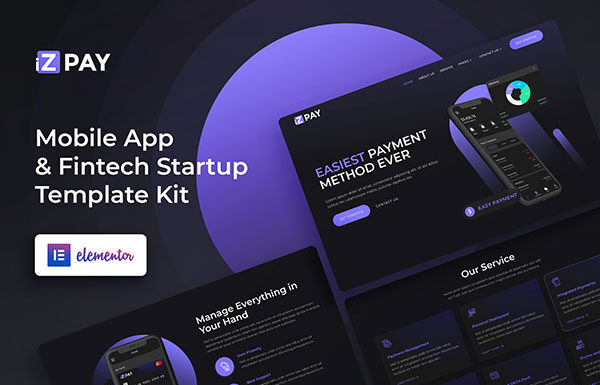
Dark mode has moved from a niche preference to a standard feature — most major operating systems and browsers now default to dark mode for a meaningful percentage of users, and those users notice immediately when a site doesn’t support it.

The benefits are practical: dark mode reduces eye strain for extended browsing, can extend battery life on OLED screens, and delivers a visually distinctive aesthetic that many users actively prefer. You don’t have to redesign your entire site in dark mode — adding a toggle that respects the user’s system preference (via CSS prefers-color-scheme) is often enough to cover most use cases. If you’re doing a full redesign, designing for both modes from the start is worth the extra investment.


2. Microinteractions and Subtle Animation

Microinteractions are small, purposeful design responses within broader motion design, and these micro interactions can be as simple as a button that changes color on hover, uses subtle hover effects, or adds micro animations to show feedback, a form field that highlights when focused, or a subtle animation when a section scrolls into view. They’re not decorative — they provide feedback, guide attention, and make a website feel polished and intentional rather than static. Done well, these cues can lower cognitive load by clarifying state changes and helping people process actions without overwhelming users.

Users increasingly expect some degree of movement and responsiveness from the sites they visit. A completely static page can feel dated compared to a site where elements respond naturally to interaction. Used lightly, scroll-triggered animations can also create more immersive layouts, and motion design enhances user engagement through storytelling while those cues guide users and improve interaction clarity.

Pro Tip: If you have to choose between animation and speed, choose speed — every time. Heavy animation that slows your load times hurts more than it helps. See our WordPress Speed Optimization service if you’re trying to find the right balance.

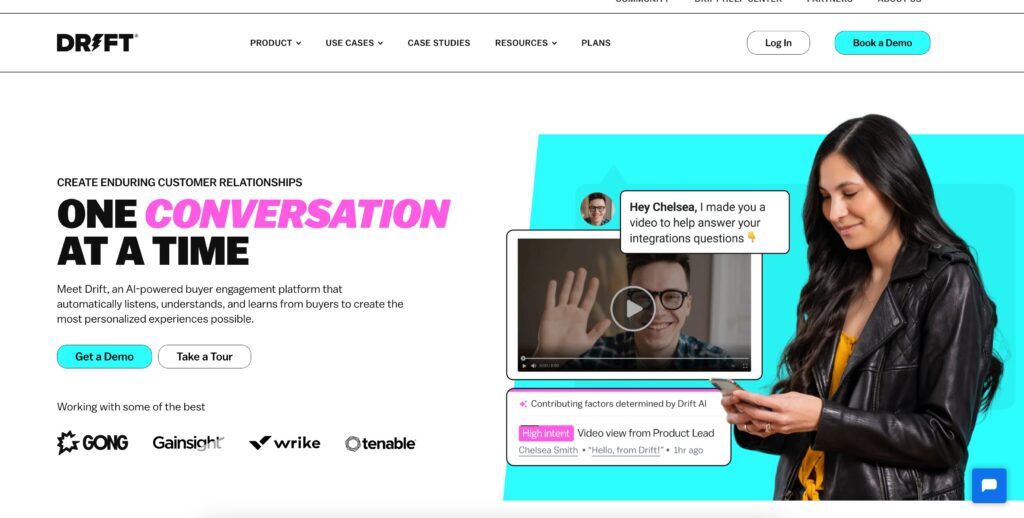
3. AI-Powered Experiences

If there’s one trend on this list that’s accelerated faster than almost anyone predicted, it’s this one. AI is now embedded in website experiences in multiple layers, and the design process is changing with it. For small businesses, it’s more accessible than ever, and 72% of web designers now use generative ai in their workflow support.

AI chatbots and assistants have become meaningfully smarter. Where 2022-era chatbots could answer basic FAQs, current AI-powered tools can handle complex product questions, qualify leads, book appointments, and escalate to a human when needed. Platforms like Intercom are leading this space with AI-native chat that works 24/7 without staff involvement.

AI-assisted personalization is the next layer — websites that adapt their content, CTAs, or product recommendations based on who’s visiting. AI can analyze real time data and user behavior to tailor product recommendations and personalize layouts for each visitor, creating adaptive website experiences instead of static ones. This is still more common at the enterprise level, but the tooling is filtering down to small business platforms. Done well, these adaptive experiences can boost engagement and conversions, including on landing pages.

For small businesses, the immediate opportunity is the AI chatbot: a visitor who has a quick question at 10pm that doesn’t want to fill out a form or wait until Monday gets an answer immediately. That interaction either converts them or doesn’t — but without the chatbot, you weren’t even in the conversation. More broadly, AI is also shaping digital experiences beyond chat by helping sites feel personal.


4. Minimalist Design with Bold Typography
Software Agency Landing Page Graphic Templates Envato Elements 2023 10 09 at 9.18.43 PM

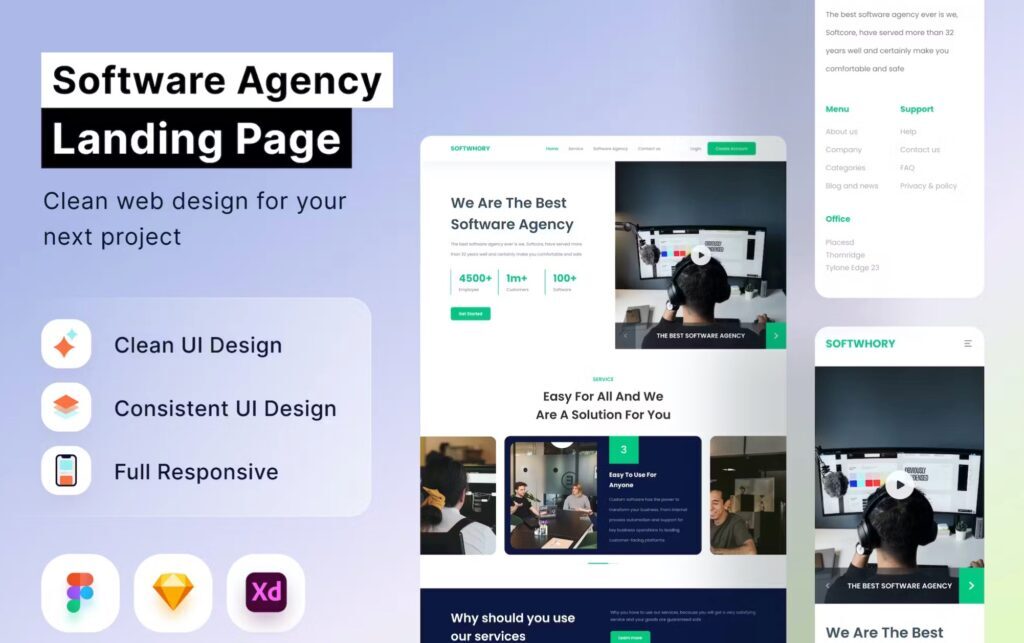
Minimalism has been a sustained trend for years, and it’s not going anywhere — for a simple reason: visitors decide within seconds whether your site is worth their time, and clean, uncluttered design communicates confidence and professionalism faster than anything else. In 2026, that means stripping away non-essential elements to cut visual noise and create structured layouts that feel modern.

The 2026 expression of this trend combines restrained layout with oversized, carefully selected typography. Big, bold headlines that state clearly what you do and who you serve, with strong typography, intentional white space, and open space creating a clear, confident page across screen sizes. The typography does the communicating — everything else gets out of the way. More than ever, it carries the brand identity and emotional tone, with subtle font choices shaping the visual identity and signaling anything from luxury to casualness.

This connects directly to the messaging principle: your homepage headline should answer “what does my customer’s life look like after working with me?” — and that answer needs to be the most visually prominent thing on the page. Large, bold, and impossible to miss, because oversized headlines create a stronger first impression, and wide lettering with generous spacing helps the message feel approachable.


5. Accessibility-First Design

Accessibility is no longer an optional consideration — it’s a design standard, a legal expectation in many jurisdictions, and increasingly a search ranking factor. WCAG 2.1 AA compliance (the current benchmark) covers the basics: sufficient color contrast, keyboard-navigable interfaces, alt text on images, properly labeled form fields, and readable font sizes.

The business case is straightforward: accessible design serves a larger audience, tends to overlap heavily with the technical quality signals search engines reward, and reduces legal exposure from accessibility complaints. It’s also significantly easier to build in from the start than to retrofit after launch.

Our WordPress Web Design process builds accessibility in from the start — not as a checklist item at the end.


6. Spatial and Immersive Elements
web design trends in 2023

With Apple Vision Pro launching in 2024 and spatial computing entering the mainstream conversation, web design has started anticipating a future where users interact with web content in three dimensions. Most small business websites aren’t building for headsets today — but the design thinking is already influencing the web.

In practice for 2026, this shows up in subtle 3D elements, depth effects, parallax scrolling done well, interactive 3D features powered by WebGL, and scroll-triggered animations that add depth in digital spaces. For e-commerce businesses, AR product visualization — letting customers see how furniture looks in their room, or how a piece of clothing fits a specific body type — has become a real differentiator for brands that use it, and Nike is a good example with virtual product trials.

Most small businesses don’t need to invest in full AR today, but staying aware of where interaction design is heading helps inform decisions now, especially when those digital elements support usability rather than distract from it and increase immersion and engagement.

7. Glassmorphism

Glassmorphism — the frosted glass aesthetic, where UI elements appear translucent with a soft blur and subtle border — has emerged as the refined evolution of earlier depth-focused design trends. You’ll recognize it in iOS interfaces and macOS system elements; it’s now filtering into web design more broadly. Its tactile depth comes from soft shadows and subtle gradients.

Used well, glassmorphism creates a sense of depth and layering that feels modern without being heavy. Used poorly, it becomes muddy and hard to read. The key is strong contrast: text and interactive elements on glass-style backgrounds must still meet accessibility contrast standards to keep frosted interfaces usable and make sites easier to navigate. When in doubt, test it.

Like neumorphism before it, this trend rewards restraint — strategic use on key UI elements works; covering an entire site in frosted glass usually doesn’t. With restraint, these effects can make interfaces feel intuitive and more connected to the physical world.

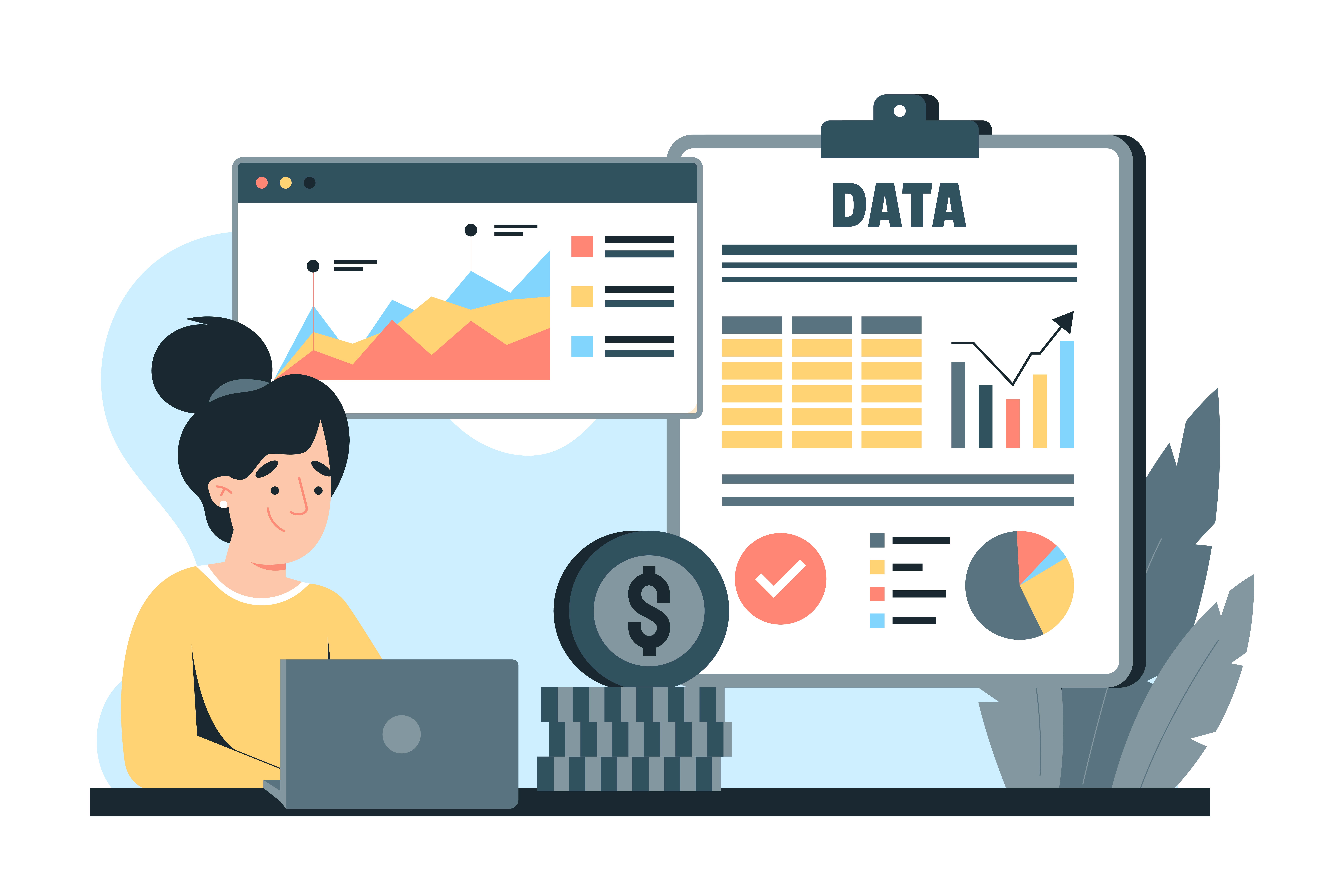
8. Data Visualization

As visitors’ time on any given page gets shorter, your ability to communicate complex ideas quickly becomes a competitive advantage. A well-designed chart, infographic, or visual comparison communicates in seconds what three paragraphs can’t quite land.

This is increasingly relevant for service businesses. Instead of explaining your process in a numbered list, show it in a visual timeline. Instead of describing your results in copy, present them as a before-and-after visualization. The investment in custom graphics pays off when you use vector illustrations to create visuals with more visual interest that stay on brand, and incorporating brand colors into those assets further strengthens the site’s visual identity.

9. Voice Interface Compatibility

Voice search and voice assistant usage continues to grow as smart speakers, in-car systems, and phone assistants become habitual. Designing for voice compatibility means two things: technical accessibility (your site’s structure should be navigable and readable by assistants), and content optimization (voice queries are conversational and question-based, so FAQ content and direct-answer blocks perform better in voice results).

The FAQ section at the bottom of this post and the Quick Answer block at the top are both examples of this — they’re structured specifically to be easy for AI and voice assistants to parse and surface.

10. Sustainability and Eco-Design

Environmental awareness is influencing purchasing decisions, and website choices are part of that picture. A sustainable website uses leaner code, optimized images, and low-impact hosting to reduce energy consumption and lower a site’s carbon footprint, and some hosting providers now offer carbon-neutral or renewable-energy-powered plans.

Accessibility features are also becoming standard here, since they overlap with sustainable web design by creating lower-friction, more efficient digital design.

This is also an opportunity for brand storytelling. If your business has sustainability values, your website can reflect them through thoughtful choices that avoid dark patterns, so performance gains do not come at the expense of trust or usability. Dark mode, efficient loading, and deliberate visual minimalism can support a stronger digital presence while still leaving room for a human touch.

Frequently Asked Questions

What are the top web design trends in 2026? The ten most relevant for small business websites are: dark mode design, microinteractions and subtle animation, AI-powered chat and personalization, minimalist design with bold typography, accessibility-first design, spatial and immersive elements, glassmorphism, data visualization, voice interface compatibility, and sustainability-conscious design. Other design trends for 2026 include bright colors and more experimental layouts and navigation patterns.

What web design trends are most important for small businesses? The highest-impact ones for small businesses specifically are AI-powered chatbots (lead capture 24/7), minimalist design with bold typography (communicates value fast), mobile-first and accessibility-first design (serves the broadest audience), and strong CTAs throughout — which isn’t a design “trend” so much as a permanent best practice. The aesthetic trends matter less than the functional ones. Some of year’s trends also move beyond standard navigation paths, using nonlinear journeys carefully so users can explore without confusion. That can include experimental navigation such as radial menus or hidden drawers, but it should be prototyped in tools like Figma Make before launch.

Is dark mode worth adding to a small business website? Yes, for most businesses. A meaningful percentage of users browse in dark mode by system preference, and CSS media queries make it possible to respect that preference without a full redesign. If you’re doing a new build or redesign, designing for both light and dark from the start is the cleanest approach.

What is glassmorphism in web design? Glassmorphism is a design style that gives UI elements a frosted-glass appearance — translucent, with a soft blur effect and subtle border. It creates a sense of depth and layering that looks modern and clean when used selectively. It’s the design direction that succeeded neumorphism as a trend.

How often should a small business update their website design? We recommend planning for a redesign no later than every 30 months. Design standards and user expectations shift meaningfully over that timeframe, and a site that looked current in 2023 can read as dated by 2025. Staying current with design trends 2026 is part of how your website maintains its first-impression value.

Do I need to implement all of these web design trends? No — and trying to implement all of them at once is a reliable path to an overwhelming, inconsistent site. Pick one or two that align with your business goals and audience, do those well, and layer in others over time. A vivid color palette with neon pinks and electric blues can build emotional connection through optimism, and high-contrast pairings are especially common for lifestyle and beauty brands. Bold gradients and neon gradients also reflect the shift toward bright, saturated palettes replacing muted tones in many of the web design trends in 2026. The most important action is consistent progress, not comprehensive implementation.

Conclusion

Web design trends are about more than aesthetics — they’re signals about how users are changing, what they expect from digital experiences, and where competitive advantages are shifting. You don’t need to implement every trend on this list, but awareness of where things are heading informs better decisions now.

If any of these trends have you thinking it’s time for a refresh, our small business website redesign overview is a good place to start. Or book a free consult and we’ll look at your site together and tell you exactly where the best opportunities are.

WordPress maintenance vs management is the single most expensive misunderstanding in the WordPress services market, and most agencies actively make it worse.

Quick answer: In the WordPress maintenance vs management comparison, maintenance is the technical upkeep that keeps a site running — updates, backups, security scanning, uptime monitoring. Management includes all of that and adds ownership of the site’s direction and performance. Maintenance keeps the site alive. Management is accountable for what it does.

Most providers reduce WordPress maintenance vs management to two tiers sitting side by side on a pricing page. Pick one.

That framing is wrong, and it is why so many businesses sign a contract expecting one thing and receive the other. Maintenance and management are not siblings. Management is the superset that contains maintenance. Every genuine management engagement includes the full maintenance task list. No maintenance plan includes management.

Get the WordPress maintenance vs management decision wrong and you end up with a site that is perfectly updated, perfectly backed up, perfectly secure — and going nowhere.


WordPress maintenance vs management at a glance

 WordPress MaintenanceWordPress Management
Core questionIs the site working?Is the site working for the business?
PostureReactive and scheduledProactive and strategic
Who decides what changesYou do. The provider executes.The provider recommends. You approve.
ScopeUpdates, backups, security scans, uptime monitoringEverything in maintenance, plus performance, content, SEO, conversion, roadmap
Monthly deliverableA completed-tasks reportA performance report with recommendations
Measured byUptime, patch currency, backup successTraffic, rankings, conversions, revenue
Accountable for outcomesNoYes
Typical US cost$50–$200/mo$250–$2,000+/mo
If you skip itThe site breaksThe site quietly stops competing

WordPress maintenance vs management: the 7 critical differences

Seven differences do the real work in WordPress maintenance vs management. Everything else is a variation on them.

1. Detection. Under maintenance, you notice problems first. Under management, your provider does.

2. Decision-making. Maintenance executes your instructions. Management forms its own recommendations.

3. Accountability. Maintenance is accountable for tasks completed. Management is accountable for business outcomes.

4. Scope boundaries. Maintenance has a fixed task list. Management has a roadmap that changes with your goals.

5. Reporting. Maintenance reports what was done. Management reports what happened and what to do next.

6. Judgement. Maintenance keeps your existing plugins updated. Management questions whether you should be running them at all.

7. Direction. Maintenance preserves the status quo. Management moves the site somewhere.


What WordPress maintenance actually covers

WordPress maintenance is the recurring technical work required to keep an installation secure, current and available. Whether you run the list in-house or buy WordPress maintenance services from an agency, that list barely changes month to month:

  • Core, plugin and theme updates, staged and tested before they touch production
  • Offsite backups with periodic restore tests — an untested backup is a guess
  • Security scanning and malware monitoring, plus firewall rules and login hardening
  • Uptime monitoring with alerting
  • Database optimisation — post revisions, expired transients, orphaned tables
  • Broken link and 404 monitoring
  • PHP compatibility checks ahead of host-forced version bumps
  • A monthly report confirming what was done

That is the whole category. It is genuinely valuable and genuinely finite.

The defining characteristic is that the provider is not deciding anything. If your plugin roster is wrong, maintenance keeps the wrong plugins updated. If your homepage does not convert, maintenance keeps a non-converting homepage online with excellent uptime.


What WordPress management adds on top

Management contains the full maintenance list, then adds responsibility for direction and performance. That is the line between buying a maintenance plan and buying website management services: one keeps the site current, the other is answerable for what it achieves.

You cannot manage a site you are not maintaining. You can absolutely maintain a site nobody is managing — and a great many businesses are doing exactly that.

Management adds performance ownership, content and publishing, SEO oversight, conversion work, roadmap planning, vendor coordination, and reporting that ties site metrics to business outcomes.


The one test that settles WordPress maintenance vs management

Ignore the feature list. Ask one question:

When something on your site should change, who notices first?

Under maintenance, you notice. You find the broken contact form when a customer complains, email your provider, and they fix it — billing you if it falls outside scope. Detection sits with you. That is not a failure; it is how maintenance is designed.

Under management, your provider notices, and comes to you with a diagnosis before you have seen the problem.

Detection order matters more than response time. If your provider’s first awareness of a problem is your email, a two-hour response SLA is irrelevant. The delay already happened, and it was measured in days.


Why “my host handles updates” is dangerously wrong

This is the costliest misunderstanding inside the WordPress maintenance vs management question, and the documentation is partly to blame.

Plugin and theme auto-updates are off by default in WordPress. The explicit statement lives on make.wordpress.org rather than user-facing docs. There is a setting called plugins_auto_update_enabled that defaults to true, which is easy to misread as auto-updates being on. It only controls whether the interface elements display.

More significantly: any plugin or theme not hosted in the WordPress.org directory receives no automatic updates at all. The update check is a single request matched by directory slug, so a commercial product produces no result. If you run a premium theme or paid plugins — and most business sites do — that entire portion of your attack surface is invisible to every automatic mechanism in the platform.

The scale is not small. Patchstack recorded 11,334 new WordPress vulnerabilities in 2025, a 42% year-on-year rise, with 91% in plugins. (Patchstack, State of WordPress Security in 2026)

Here is why that lands on the management side of the WordPress maintenance vs management line. Patching on schedule is a checklist task. Deciding which plugins are worth their attack surface, keeping a tracked manual process for every commercial product the auto-updater cannot see, and noticing when a vendor has abandoned a plugin — those are judgement calls. No checklist produces them.

One honest caveat. The widely repeated claim that plugin vulnerabilities cause most WordPress compromises is not currently sourced. The 91% figure describes the vulnerability catalogue, not breach causes. The most recent hacked-site telemetry, Sucuri’s 2023 report, found 13.97% of compromised sites had a vulnerable component present — presence, not cause. Meanwhile Wordfence blocked 55 billion password-hacking attempts against 48 billion vulnerability-targeting requests in 2024, and both vendors name stolen credentials as the rising intrusion source. (Wordfence, 2024 Annual WordPress Security Report)

Which is itself the argument. Maintenance patches. Management looks at where the evidence points and fixes your credential controls too.


WordPress maintenance vs management in five real scenarios

ScenarioMaintenance onlyFull management
Critical plugin vulnerability disclosedPatched next scheduled cycleIdentified, staged, tested, deployed — including commercial plugins no auto-updater reaches
Traffic spike overloads the serverSite slows; you hear it from visitorsLoad monitored, resources scaled before users notice
Rankings decline over three monthsYou find it in Analytics weeks laterFlagged in the monthly report with a fix
Contact forms stop capturing leadsYou find out when prospects stop callingConversion tracking catches it and escalates
Seasonal campaign needs a new featureYou request a quote; billed separatelyProposed proactively as part of the roadmap

That is WordPress maintenance vs management in practice: maintenance keeps the engine running, management drives the car somewhere.


Where hosting and support fit into WordPress maintenance vs management

Managed WordPress hosting covers the server: infrastructure uptime, server-side caching, platform security, sometimes automatic core updates. It does not cover anything inside your install. If a plugin update breaks your checkout, your host will tell you that is not their problem.

WordPress support services are reactive help on request. Something breaks, you open a ticket, someone fixes it. Support is measured in response time. Maintenance is measured in prevention.

The clean hierarchy:

  1. Hosting — where the site runs
  2. Maintenance — keeping what runs healthy
  3. Support — fixing what breaks
  4. Management — all of the above, plus deciding what should change and owning the result

WordPress maintenance vs management: which does your business need?

Your decision is not which to pick. It is how far up the hierarchy your site needs to go.

WordPress maintenance vs management: choose maintenance when…

  • The site is primarily informational, changing infrequently
  • It is not central to lead generation or revenue
  • Someone internal can handle edits and recognise breakage
  • You accept being first to notice problems, because the stakes are lower

Paying management rates here is a waste. Buy good maintenance and spend the difference elsewhere.

WordPress maintenance vs management: choose management when…

  • The site supports lead generation, ecommerce or donations
  • Downtime or slow performance has material financial impact
  • You cannot describe the site’s roadmap for the next year
  • Multiple integrations create dependencies nobody is watching
  • Nobody internally owns the site’s performance

This is the most expensive gap we see: a site receiving excellent maintenance, no downtime in two years, and not one ranking position gained. The provider did nothing wrong — nobody asked them to.

If you are losing leads because something broke and nobody noticed for days, you do not have a maintenance problem. You have a management gap.

Start with maintenance, upgrade later when…

You are early, budget is tight, and the site is not yet a primary channel. Set a trigger and revisit. The mistake is not starting with maintenance — it is staying there for four years while expecting management outcomes.


Five questions that settle WordPress maintenance vs management before you sign

  1. Who decides what changes on my site? “You tell us” means maintenance.
  2. How do you detect issues, and how fast? Management describes monitoring, alerting and SLAs.
  3. Do you test updates in staging first? Lower tiers push straight to production.
  4. What is in the monthly report? Completed tasks is maintenance. Metrics with recommendations is management.
  5. What is out of scope, and what does it cost? A provider who cannot answer quickly has not thought about it.

Red flags

  • A plan marketed as management, priced at maintenance rates, with no strategic work
  • No proactive monitoring beyond a basic uptime check
  • No tracked process for commercial plugins and themes
  • The provider has never contacted you first. You always initiate.

Audit which side of WordPress maintenance vs management you are paying for

  1. Review the last three issues. Did your provider flag them, or did you?
  2. Check six months of reports. Tasks, or metrics with recommendations?
  3. Count your commercial plugins and themes — those get nothing automatically.
  4. Map the site’s business role. Revenue or leads means maintenance alone is insufficient.
  5. Match spend to need. Do not overpay on a brochure site; do not underpay on a revenue site.

WordPress maintenance vs management FAQ

What is the difference between WordPress maintenance vs management?

Maintenance is scheduled technical upkeep — updates, backups, security scanning, uptime monitoring. Management includes every maintenance task and adds ownership of performance, content, SEO and business outcomes. Maintenance sits inside management rather than beside it, which is why every management plan includes maintenance but no maintenance plan includes management.

No. Managed hosting is a server product covering infrastructure, caching and platform security. Management is a service relationship covering everything inside your site, including strategy. You can have both, and most active business sites should.

Over the past six months, has your provider contacted you about a performance decline or a ranking drop before you noticed? Do reports contain recommendations, or only completed tasks? If the answer to both is no, you are receiving maintenance regardless of what the invoice says.

Yes, and many businesses should. As traffic and revenue dependence grow, the cost of nobody noticing problems first grows with them. Most providers offer stackable tiers that make the transition straightforward.

In the US market, WordPress maintenance plans typically run $50–$200 per month. Management generally starts around $250 and rises with scope, commonly reaching $1,000–$2,000 where the provider owns SEO, content and conversion work.

Because plugin and theme auto-updates are off by default in WordPress, and anything outside the WordPress.org directory receives no automatic updates at all. Most business sites run at least one commercial theme or paid plugin, so the platform’s automatic machinery cannot reach a meaningful part of the attack surface.

Yes, and for a simple site it is reasonable. Budget two to four hours a month. The failure mode is not incompetence — it is the third consecutive month where something more urgent came up.

With proper monitoring, critical issues should be detected within minutes and a six-business-hour response is a reasonable benchmark. But detection matters more than response. If your provider’s first awareness comes from your email, the delay already happened.

The site stays secure, current and online. It will not improve. Over two or three years, competitors actively managing their sites will out-rank and out-convert you, and your maintenance reports will show green the entire time.

WordPress maintenance vs management: the short version

The WordPress maintenance vs management question comes down to this: maintenance answers “is the site working?” Management answers “is the site working for the business?” One is contained inside the other, and confusing them is the most common reason businesses feel let down by a provider who is technically delivering exactly what was purchased.

Work out which question you need answered, then buy accordingly.

Search

Popular Posts

Small Biz Website Tips Newsletter

Stay up to date with the latest marketing, sales, and service tips and news.

Small Biz Website Tips Newsletter

Stay up to date with the latest marketing, sales, and service tips and news.