
Jetpack Plugin for WordPress: Soar or Fall?

jetpack bgAutomattic.com just released a collection of plugins as one “super-plugin” called Jetpack. As they explained it, the goal was to bring eight of the most requested features available on WordPress.com to the millions of self-hosted WordPress sites in one easy-to-install curated package. Let’s take a look at each feature:

Stats
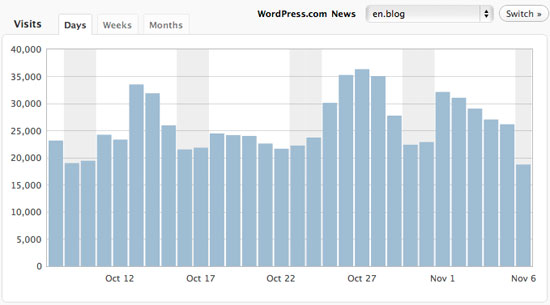
statsThis feature is the same stats-tracking module that all WordPress.com blogs use. It loads a small smiley-face image on each post and page view and uses that to track page views by visitors (Googlebot and other non-Javascript-enabled visitors won’t be counted). On the Stats page in your wp-admin, it will give you basic information on the number of visits, the search terms/referrers that brought them to your site, the top pages or posts, and so on. It doesn’t give you any more detailed information, such as the browsers and browser versions of each visitor, the total number of unique visitors, the countries they are from, etc. For those kinds of statistics, you’d need to use a more advanced statistics service such as Google Analytics or GoSquared.

Twitter Widget

This is a widget that will show a list of the latest Tweets from any Twitter account. The configuration is easy; simply drag the widget to any widgetized area in your theme, pop in your Twitter username (or someone else’s), configure a couple of other options if you want, and boom, there you go! Instant Tweets!

Gravatar Hovercards

hovercardThis is one that’s easier to explain with an image than without. If the commentor has a Gravatar profile the information they have included will appear when someone hovers over their avatar image in the comments. You can see a live example on the WordPress.com Gravatar Blog where they first revealed the new feature. With Jetpack, you can easily turn this feature on or off.

WP.me shortlinks

If you click on the “Get Shortlink” button when you are on the post edit page in your wp-admin, normally it would give you something like https://mydomain.com/?p=34. This often isn’t that much shorter than the original permalink, so it isn’t that useful for posting a link to Twitter, for example. With Jetpack, you will instead get a WP.me link, such as https://WP.me/j7gv9, which is obviously much shorter. Of course, you could also use bit.ly or even roll your own link shortener solution, but this one is effortlessly integrated into the post editor screen.

Sharedaddy
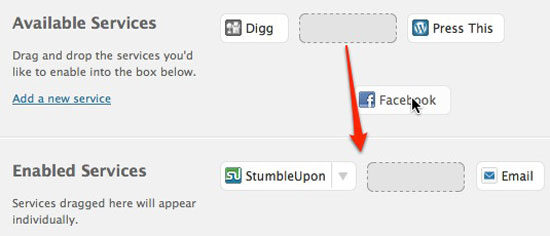
sharedaddyThis feature lets you easily add those ubiquitous sharing buttons you find on most websites, including buttons to Tweet, Share and Like on Facebook, Digg, send by email, etc. The configuration is relatively simple, but the buttons themselves might require some CSS attention if you really want them to stand out (or not stand out as much).

LaTeX

This is something that likely won’t be used by many, but will be highly appreciated by those who need it. LaTeX is a markup language for writing mathematical equations, formulas, etc., and this part of the Jetpack lets you easily include them in your posts.

After the Deadline
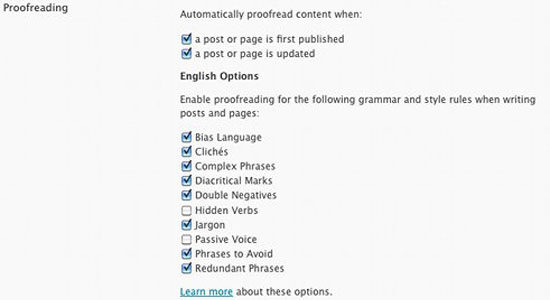
proofreadingThis plugin lets you check your spelling, grammar, punctuation and style from the post editor. It is more powerful than the regular spellcheck integrated in Firefox. It can check for misused words (example: accept and except, or their and there). It will warn you when using clichés or jargon. It is not a replacement for careful reading and editing of your writing, but as is the case with Microsoft Word or other word processors, it is a useful tool to help you minimize and correct common errors.

Shortcode Embeds

Shortcodes are small macro codes enclosed in square brackets that allow you to access some special functionality from within a page or a post. Jetpack comes with several media-related shortcodes that make it easy to embed a video from YouTube or a presentation from Slideshare into your post. Each one has its own parameters that may or may not be required, so you’re better off reading the instructions for each one. The shortcodes are: archives, audio, blip.tv, dailymotion, digg, flickr, googlevideo, scribd, slide, slideshare, soundcloud, vimeo, youtube, and polldaddy.

Future?

The Jetpack site as well as the plugin’s options page in the wp-admin include teaser boxes that hint at upcoming additions to the package. I won’t speculate on what they might be, but please go ahead and do so in the comments below!

Soar or fall?

For the power-user or site developer, Jetpack is probably not the ideal solution. Each front-end feature adds extra weight to your site (in javascript and extra http requests), and there may be other plugins or even custom code that can do the same things but with more options or leaner code. For the casual blogger however, it adds some (mostly) useful features and even exposes some that they may not have even been aware of (Hovercards, anyone?). I probably won’t use it on my own sites, but I’m looking forward to seeing what other functions will be included in the future.


WordPress maintenance vs management is the single most expensive misunderstanding in the WordPress services market, and most agencies actively make it worse.

Quick answer: In the WordPress maintenance vs management comparison, maintenance is the technical upkeep that keeps a site running — updates, backups, security scanning, uptime monitoring. Management includes all of that and adds ownership of the site’s direction and performance. Maintenance keeps the site alive. Management is accountable for what it does.

Most providers reduce WordPress maintenance vs management to two tiers sitting side by side on a pricing page. Pick one.

That framing is wrong, and it is why so many businesses sign a contract expecting one thing and receive the other. Maintenance and management are not siblings. Management is the superset that contains maintenance. Every genuine management engagement includes the full maintenance task list. No maintenance plan includes management.

Get the WordPress maintenance vs management decision wrong and you end up with a site that is perfectly updated, perfectly backed up, perfectly secure — and going nowhere.


WordPress maintenance vs management at a glance

 WordPress MaintenanceWordPress Management
Core questionIs the site working?Is the site working for the business?
PostureReactive and scheduledProactive and strategic
Who decides what changesYou do. The provider executes.The provider recommends. You approve.
ScopeUpdates, backups, security scans, uptime monitoringEverything in maintenance, plus performance, content, SEO, conversion, roadmap
Monthly deliverableA completed-tasks reportA performance report with recommendations
Measured byUptime, patch currency, backup successTraffic, rankings, conversions, revenue
Accountable for outcomesNoYes
Typical US cost$50–$200/mo$250–$2,000+/mo
If you skip itThe site breaksThe site quietly stops competing

WordPress maintenance vs management: the 7 critical differences

Seven differences do the real work in WordPress maintenance vs management. Everything else is a variation on them.

1. Detection. Under maintenance, you notice problems first. Under management, your provider does.

2. Decision-making. Maintenance executes your instructions. Management forms its own recommendations.

3. Accountability. Maintenance is accountable for tasks completed. Management is accountable for business outcomes.

4. Scope boundaries. Maintenance has a fixed task list. Management has a roadmap that changes with your goals.

5. Reporting. Maintenance reports what was done. Management reports what happened and what to do next.

6. Judgement. Maintenance keeps your existing plugins updated. Management questions whether you should be running them at all.

7. Direction. Maintenance preserves the status quo. Management moves the site somewhere.


What WordPress maintenance actually covers

WordPress maintenance is the recurring technical work required to keep an installation secure, current and available. Whether you run the list in-house or buy WordPress maintenance services from an agency, that list barely changes month to month:

  • Core, plugin and theme updates, staged and tested before they touch production
  • Offsite backups with periodic restore tests — an untested backup is a guess
  • Security scanning and malware monitoring, plus firewall rules and login hardening
  • Uptime monitoring with alerting
  • Database optimisation — post revisions, expired transients, orphaned tables
  • Broken link and 404 monitoring
  • PHP compatibility checks ahead of host-forced version bumps
  • A monthly report confirming what was done

That is the whole category. It is genuinely valuable and genuinely finite.

The defining characteristic is that the provider is not deciding anything. If your plugin roster is wrong, maintenance keeps the wrong plugins updated. If your homepage does not convert, maintenance keeps a non-converting homepage online with excellent uptime.


What WordPress management adds on top

Management contains the full maintenance list, then adds responsibility for direction and performance. That is the line between buying a maintenance plan and buying website management services: one keeps the site current, the other is answerable for what it achieves.

You cannot manage a site you are not maintaining. You can absolutely maintain a site nobody is managing — and a great many businesses are doing exactly that.

Management adds performance ownership, content and publishing, SEO oversight, conversion work, roadmap planning, vendor coordination, and reporting that ties site metrics to business outcomes.


The one test that settles WordPress maintenance vs management

Ignore the feature list. Ask one question:

When something on your site should change, who notices first?

Under maintenance, you notice. You find the broken contact form when a customer complains, email your provider, and they fix it — billing you if it falls outside scope. Detection sits with you. That is not a failure; it is how maintenance is designed.

Under management, your provider notices, and comes to you with a diagnosis before you have seen the problem.

Detection order matters more than response time. If your provider’s first awareness of a problem is your email, a two-hour response SLA is irrelevant. The delay already happened, and it was measured in days.


Why “my host handles updates” is dangerously wrong

This is the costliest misunderstanding inside the WordPress maintenance vs management question, and the documentation is partly to blame.

Plugin and theme auto-updates are off by default in WordPress. The explicit statement lives on make.wordpress.org rather than user-facing docs. There is a setting called plugins_auto_update_enabled that defaults to true, which is easy to misread as auto-updates being on. It only controls whether the interface elements display.

More significantly: any plugin or theme not hosted in the WordPress.org directory receives no automatic updates at all. The update check is a single request matched by directory slug, so a commercial product produces no result. If you run a premium theme or paid plugins — and most business sites do — that entire portion of your attack surface is invisible to every automatic mechanism in the platform.

The scale is not small. Patchstack recorded 11,334 new WordPress vulnerabilities in 2025, a 42% year-on-year rise, with 91% in plugins. (Patchstack, State of WordPress Security in 2026)

Here is why that lands on the management side of the WordPress maintenance vs management line. Patching on schedule is a checklist task. Deciding which plugins are worth their attack surface, keeping a tracked manual process for every commercial product the auto-updater cannot see, and noticing when a vendor has abandoned a plugin — those are judgement calls. No checklist produces them.

One honest caveat. The widely repeated claim that plugin vulnerabilities cause most WordPress compromises is not currently sourced. The 91% figure describes the vulnerability catalogue, not breach causes. The most recent hacked-site telemetry, Sucuri’s 2023 report, found 13.97% of compromised sites had a vulnerable component present — presence, not cause. Meanwhile Wordfence blocked 55 billion password-hacking attempts against 48 billion vulnerability-targeting requests in 2024, and both vendors name stolen credentials as the rising intrusion source. (Wordfence, 2024 Annual WordPress Security Report)

Which is itself the argument. Maintenance patches. Management looks at where the evidence points and fixes your credential controls too.


WordPress maintenance vs management in five real scenarios

ScenarioMaintenance onlyFull management
Critical plugin vulnerability disclosedPatched next scheduled cycleIdentified, staged, tested, deployed — including commercial plugins no auto-updater reaches
Traffic spike overloads the serverSite slows; you hear it from visitorsLoad monitored, resources scaled before users notice
Rankings decline over three monthsYou find it in Analytics weeks laterFlagged in the monthly report with a fix
Contact forms stop capturing leadsYou find out when prospects stop callingConversion tracking catches it and escalates
Seasonal campaign needs a new featureYou request a quote; billed separatelyProposed proactively as part of the roadmap

That is WordPress maintenance vs management in practice: maintenance keeps the engine running, management drives the car somewhere.


Where hosting and support fit into WordPress maintenance vs management

Managed WordPress hosting covers the server: infrastructure uptime, server-side caching, platform security, sometimes automatic core updates. It does not cover anything inside your install. If a plugin update breaks your checkout, your host will tell you that is not their problem.

WordPress support services are reactive help on request. Something breaks, you open a ticket, someone fixes it. Support is measured in response time. Maintenance is measured in prevention.

The clean hierarchy:

  1. Hosting — where the site runs
  2. Maintenance — keeping what runs healthy
  3. Support — fixing what breaks
  4. Management — all of the above, plus deciding what should change and owning the result

WordPress maintenance vs management: which does your business need?

Your decision is not which to pick. It is how far up the hierarchy your site needs to go.

WordPress maintenance vs management: choose maintenance when…

  • The site is primarily informational, changing infrequently
  • It is not central to lead generation or revenue
  • Someone internal can handle edits and recognise breakage
  • You accept being first to notice problems, because the stakes are lower

Paying management rates here is a waste. Buy good maintenance and spend the difference elsewhere.

WordPress maintenance vs management: choose management when…

  • The site supports lead generation, ecommerce or donations
  • Downtime or slow performance has material financial impact
  • You cannot describe the site’s roadmap for the next year
  • Multiple integrations create dependencies nobody is watching
  • Nobody internally owns the site’s performance

This is the most expensive gap we see: a site receiving excellent maintenance, no downtime in two years, and not one ranking position gained. The provider did nothing wrong — nobody asked them to.

If you are losing leads because something broke and nobody noticed for days, you do not have a maintenance problem. You have a management gap.

Start with maintenance, upgrade later when…

You are early, budget is tight, and the site is not yet a primary channel. Set a trigger and revisit. The mistake is not starting with maintenance — it is staying there for four years while expecting management outcomes.


Five questions that settle WordPress maintenance vs management before you sign

  1. Who decides what changes on my site? “You tell us” means maintenance.
  2. How do you detect issues, and how fast? Management describes monitoring, alerting and SLAs.
  3. Do you test updates in staging first? Lower tiers push straight to production.
  4. What is in the monthly report? Completed tasks is maintenance. Metrics with recommendations is management.
  5. What is out of scope, and what does it cost? A provider who cannot answer quickly has not thought about it.

Red flags

  • A plan marketed as management, priced at maintenance rates, with no strategic work
  • No proactive monitoring beyond a basic uptime check
  • No tracked process for commercial plugins and themes
  • The provider has never contacted you first. You always initiate.

Audit which side of WordPress maintenance vs management you are paying for

  1. Review the last three issues. Did your provider flag them, or did you?
  2. Check six months of reports. Tasks, or metrics with recommendations?
  3. Count your commercial plugins and themes — those get nothing automatically.
  4. Map the site’s business role. Revenue or leads means maintenance alone is insufficient.
  5. Match spend to need. Do not overpay on a brochure site; do not underpay on a revenue site.

WordPress maintenance vs management FAQ

What is the difference between WordPress maintenance vs management?

Maintenance is scheduled technical upkeep — updates, backups, security scanning, uptime monitoring. Management includes every maintenance task and adds ownership of performance, content, SEO and business outcomes. Maintenance sits inside management rather than beside it, which is why every management plan includes maintenance but no maintenance plan includes management.

No. Managed hosting is a server product covering infrastructure, caching and platform security. Management is a service relationship covering everything inside your site, including strategy. You can have both, and most active business sites should.

Over the past six months, has your provider contacted you about a performance decline or a ranking drop before you noticed? Do reports contain recommendations, or only completed tasks? If the answer to both is no, you are receiving maintenance regardless of what the invoice says.

Yes, and many businesses should. As traffic and revenue dependence grow, the cost of nobody noticing problems first grows with them. Most providers offer stackable tiers that make the transition straightforward.

In the US market, WordPress maintenance plans typically run $50–$200 per month. Management generally starts around $250 and rises with scope, commonly reaching $1,000–$2,000 where the provider owns SEO, content and conversion work.

Because plugin and theme auto-updates are off by default in WordPress, and anything outside the WordPress.org directory receives no automatic updates at all. Most business sites run at least one commercial theme or paid plugin, so the platform’s automatic machinery cannot reach a meaningful part of the attack surface.

Yes, and for a simple site it is reasonable. Budget two to four hours a month. The failure mode is not incompetence — it is the third consecutive month where something more urgent came up.

With proper monitoring, critical issues should be detected within minutes and a six-business-hour response is a reasonable benchmark. But detection matters more than response. If your provider’s first awareness comes from your email, the delay already happened.

The site stays secure, current and online. It will not improve. Over two or three years, competitors actively managing their sites will out-rank and out-convert you, and your maintenance reports will show green the entire time.

WordPress maintenance vs management: the short version

The WordPress maintenance vs management question comes down to this: maintenance answers “is the site working?” Management answers “is the site working for the business?” One is contained inside the other, and confusing them is the most common reason businesses feel let down by a provider who is technically delivering exactly what was purchased.

Work out which question you need answered, then buy accordingly.

Search

Popular Posts

Small Biz Website Tips Newsletter

Stay up to date with the latest marketing, sales, and service tips and news.

Small Biz Website Tips Newsletter

Stay up to date with the latest marketing, sales, and service tips and news.

