


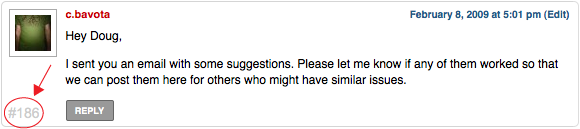
 I have been receiving a large amount of comments on my Magazine Basic theme and I was having a bit of trouble referencing certain ones, so I decided to add some numbers to the side of each comments to make it easier. It was actually a simple thing to do so here is a quick tutorial. I use the classic theme that comes pre-installed on WordPress for the example.
Open comments.php and find this the lines that look similar to this:
Now all you need to do is change it to this:
After that, open up your style.css and add something like this:
.commentnumber {
position: absolute;
right: 5px;
top: 5px;
font-size: 18px;
color: #efefef;
}

.commentlist li {
position: relative;
}
And that should do it.

— @